MimiTask for iPhone
Your tasks, at the right time.
MimiTask alerts you about a task at the time you choose. It can ring in your earphones, use an iPhone alarm, or send a silent notification.
Preparing for the App Store
For iPhone · iOS 26 or later · Japanese / English
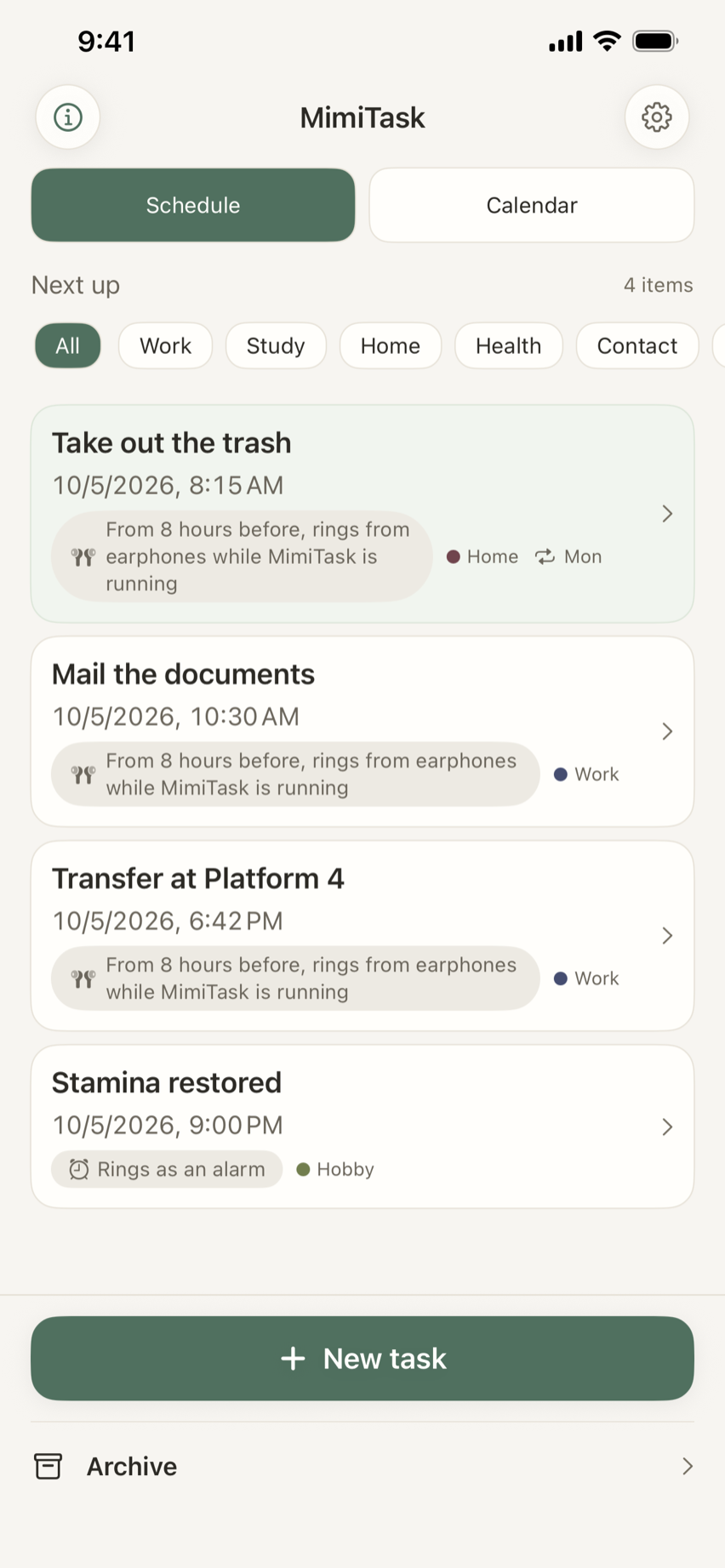
Everyday moments
One day, one clear list.
For example, you can use it like this. Give each task a time and use tags to tell them apart.
- Repeating to-doHome
Every Monday, 8:15 AM · Take out the trash
Set a weekly task once and let it repeat.
- One-time to-doWork
10:30 AM · Mail the documents
Get one reminder, then mark it complete.
- Train transferWork
6:42 PM · Transfer at Platform 4
Put the transfer time on your task list.
- Game timerHobby
9:00 PM · Stamina restored
Keep a game timer alongside the rest of your day.
A second task, recurring schedules, and tags are Pro features. Here is what Pro unlocks:
- Keep as many tasks as you like
- Keep tasks in the archive
- Color-code and filter with tags
- See the calendar
- Repeat on a schedule
- Choose your alarm sound
- Search the archive
- Reuse a task
Pro is a one-time in-app purchase, and it’s yours to keep. There are no recurring charges.
A little less to remember
Make a little room in your mind.
Put a task beside the time it matters. MimiTask alerts you when that time comes, so you do not have to keep checking the clock.
- 01
Set a time
Enter what you need to do and choose when you want to be alerted.
- 02
Choose an alert
Choose earphones, an iPhone alarm, or a silent notification for each task.
- 03
Mark it complete
Stopping the sound does not complete the task. You can also move the alert to a later time.
Choose how to be alerted
An alert that fits the task.
Choose what happens when your earphones are unavailable, too.
Earphones, else phone
Rings in your earphones when they are connected, and from the phone when they are not. If MimiTask isn’t running, or the wait stops partway, an alarm set up in advance alerts you instead.
Earphones, else notification
Rings in your earphones when they are connected. If none are connected, or MimiTask isn’t running, a silent notification alerts you instead.
Alarm
Alerts you as an iPhone alarm. Where the sound plays follows your iPhone’s settings.
Silent notification
Alerts you with an on-screen notification (+ vibration), without sound.
Before you rely on an alert
A few things to know about earphone alerts.
- Register Bluetooth earphones in the app’s settings. Wired earphones are recognized automatically.
- MimiTask waits to ring in your earphones from 8 hours before the time, and only while it’s running. If you swipe the app away, it can’t ring from your earphones.
- When it can’t ring from your earphones, you’re alerted with an alarm set up in advance or a silent notification, depending on the ring style you chose. After you save, the task screen shows whether the iPhone alert was scheduled.
- The longer it waits, the more battery it uses.
- When you’re alerted with an alarm, it may ring from the phone even if you’re wearing earphones.
Private by design
Your tasks stay in your space.
Tasks and records are stored on your iPhone. When iCloud is available, they also sync to your private iCloud. MimiTask has no developer-operated collection server, ads, or in-app usage analytics.
A quiet way to remember what matters.
MimiTask is preparing for the App Store. Find detailed help and information about your data below.
Preparing for the App Store